Gaming
Browser Games vs Downloaded Games: The Ultimate Comparison for Modern Players
An in-depth analysis of browser games versus downloaded games, comparing accessibility, performance, development ecosystems, and financial models for players and creators.
Written by
Kaushik Hirpara
Developer · Game Reviewer
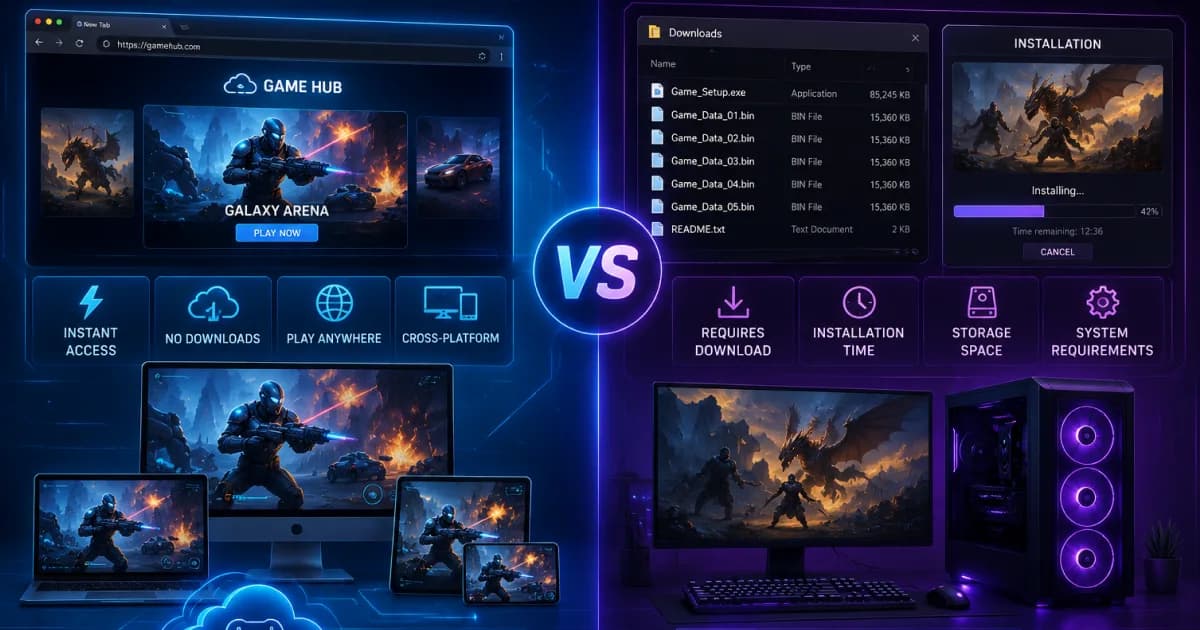
The Changing Landscape of Modern Digital Entertainment Platforms
The digital entertainment industry has undergone several major shifts over the past few decades, fundamentally changing how players interact with, purchase, and enjoy video games. In the early days of personal computing, the distribution model was simple, relying entirely on physical media like discs and cartridges that required direct installation onto a machine's local storage. Today, players are presented with two distinct paths for satisfying their gaming habits: instantly accessible web browser games or traditional, heavy locally downloaded client installations. Both formats have evolved significantly alongside modern network infrastructure, offering unique advantages tailored to different lifestyles, hardware setups, and player preferences.
As high-speed internet connection became standard globally, the technical boundaries that once strictly separated web-based software from native desktop software began to blur. Web applications can now leverage advanced hardware acceleration, while native installations have grown to massive sizes, often demanding hundreds of gigabytes of storage space and hours of setup time. Understanding the core technical, practical, and financial differences between these two distribution models is essential for both players looking to optimize their leisure time and developers choosing where to build their next project. This comprehensive breakdown explores how both ecosystems operate in the modern era and where the industry is heading next.
Frictionless Accessibility and the Instant Play Revolution
The most immediate and undeniable advantage of web browser gaming is its lack of structural friction, allowing players to jump into an experience almost instantaneously. Traditional gaming setups require a multi-step onboarding pipeline that includes purchasing a title, allocating local storage space, waiting for a massive download to finish, installing secondary launcher clients, and applying day-one patches. This lengthy process creates a psychological barrier to entry, often discouraging casual players who simply want a quick entertainment session during a busy day or a short work break.
Browser-based titles completely bypass this barrier by delivering game files dynamically on demand through standard web protocols. A player only needs to click a URL link, and the experience loads within seconds, utilizing the browser's internal engine to render graphics and process logic on the fly. This instant accessibility makes web gaming uniquely suited for social sharing and viral growth, as an entire community can jump into the exact same match simply by clicking a shared link on social media. Platforms like Unihfy Games have capitalized heavily on this frictionless approach, offering premium interactive experiences without forcing the user to sit through tedious installation bars or system updates.
Hardware Independence and the Democratization of Interactive Play
Downloaded native titles are deeply tied to the local hardware capabilities of the consumer's machine, often requiring expensive dedicated graphics cards, multi-core processors, and massive solid-state drives to run smoothly. This hardware dependence creates an economic divide, pricing out millions of potential players who cannot afford or choose not to invest in high-end gaming rigs or the latest console hardware. Furthermore, cross-platform compatibility remains a consistent headache for native developers, as a game built specifically for Windows requires substantial reprogramming to function on macOS, Linux, or mobile operating systems.
Web browser experiences natively solve this compatibility problem by operating within a unified ecosystem managed by standard modern web browsers like Chrome, Firefox, Safari, and Edge. Because the browser acts as a universal runtime environment, a single web game can run seamlessly on an old office laptop, a sleek modern tablet, a flagship smartphone, or a high-end desktop computer. This cross-device fluidity democratizes gaming, ensuring that high-quality interactive entertainment is accessible to anyone with an internet connection, regardless of their financial resources or hardware limitations.
The Technical Limits of Performance and Graphic Fidelity
While web browsers have made monumental leaps in performance, native downloaded client applications still hold a significant advantage when it comes to raw processing power and high-end visual fidelity. A downloaded game communicates directly with the operating system and local hardware drivers, allowing developers to optimize resource distribution and utilize every ounce of power from the GPU and CPU. This direct hardware access is absolutely necessary for rendering photorealistic open worlds, simulating advanced real-time physics, and maintaining high frame rates at 4K resolutions.
In contrast, browser games operate inside a secure sandboxed environment, introducing an unavoidable layer of technical translation that limits raw performance. Web developers must work within the memory and processing constraints imposed by the browser to protect the user's underlying operating system from security vulnerabilities. While modern web standards like WebGL and WebAssembly allow browsers to deliver impressive 3D visuals and fast execution speeds, they cannot fully match the performance of a native application that has unrestricted access to the local system's hardware capabilities.
Storage Management and the Burden of Local Digital Real Estate
As video games have grown in visual complexity, their file sizes have inflated at an alarming rate, turning local storage space into a premium commodity for modern computer users. It is now common for a single mainstream downloaded title to occupy anywhere from 80 to 150 gigabytes of storage space, driven by high-resolution texture packs, uncompressed audio files, and complex cinematic assets. This storage bloat forces players into a frustrating cycle of digital real estate management, where they must constantly delete older games or personal files just to clear enough room for a new installation.
Web browser gaming completely eliminates this storage anxiety by relying on dynamic asset caching and server-side storage architectures. Game assets are temporarily downloaded into the browser's cache during play and are managed automatically by the application's clean-up protocols, leaving your local hard drive completely untouched. This lightweight approach is incredibly liberating for users who share their computers for work and study, allowing them to enjoy a diverse library of entertainment options without compromising their device's storage capacity for essential productivity applications.
The Mechanics of Offline Functionality and Network Dependency
A critical trade-off in the comparison between these two distribution models is how they handle network connectivity and offline availability. Downloaded games, once fully installed on a hard drive, can frequently be played completely offline without any active internet connection, assuming they do not rely on mandatory live-service elements. This offline independence makes local installations incredibly reliable for travelers, users living in rural areas with unstable internet infrastructure, or anyone looking to disconnect from the web during their leisure time.
Browser games, by their very nature, are fundamentally tethered to the internet, requiring an active network connection to fetch initial assets, communicate with multiplayer servers, and save player progress. If your internet connection drops, experiences unexpected latency spikes, or goes down completely, a browser-based game will immediately lock up or fail to load entirely. While modern service workers and offline web caching techniques are helping to bridge this gap, web-based titles remain inherently dependent on a stable connection to function as intended.
Monetization Models and the Economics of Free-to-Play Ecosystems
The financial structures supporting browser and downloaded games have diverged significantly, shaping how players value and interact with digital content. Downloaded games often rely on a premium upfront purchase model, where players pay a substantial flat fee before downloading the software, or a free-to-play framework supported by microtransactions and season passes. Because developers must recoup massive production and marketing budgets, these monetization models can sometimes feel aggressive, locking desirable content, cosmetics, and progression mechanics behind steep paywalls.
Browser gaming, on the other hand, has historically championed the ad-supported and free-to-play model, offering immediate value to players without demanding upfront financial commitments. Creators monetize their web experiences through subtle banner advertisements, rewarded video clips, or optional micro-purchases for cosmetic adjustments and fast-travel mechanics. This casual economic framework allows players to sample dozens of different experiences risk-free, creating a highly dynamic marketplace where games succeed based on their ability to instantly engage the user rather than their marketing budgets.
The Developer's Perspective on Distribution and Ecosystem Control
For game developers, choosing where to deploy a project is a defining strategic decision that influences development timelines, distribution costs, and long-term profitability. Building a downloaded title for traditional storefronts requires navigating strict verification pipelines, adhering to rigid platform guidelines, and sacrificing a significant revenue cut—often up to 30 percent—to the marketplace operator. Furthermore, deploying updates or hotfixes to a native game requires packaging a new build and pushing it through approval systems, delaying critical bug fixes.
Web deployment grants developers absolute freedom and direct control over their product's lifecycle. There are no gatekeepers dictating content rules or taking massive revenue cuts from direct web sales, allowing creators to keep a much larger share of their earnings. Updating a browser game is as simple as uploading new files directly to a web server; the next time a player refreshes their browser page, they are instantly running the latest version of the game. This rapid iteration loop enables web developers to respond immediately to community feedback, fix critical exploits in real time, and continuously evolve their gameplay design without friction.
Security Paradigms, Malicious Code, and User Protection
Security is a major factor when evaluating digital software distribution, with both delivery formats presenting entirely different risk profiles for the end-user. Downloading and installing an executable file from an unknown or untrusted source on the internet carries inherent security risks, as malicious software can easily masquerade as a legitimate game installation. Once granted administrative privileges on a local system, a malicious native application can access sensitive personal files, log keystrokes, compromise financial accounts, or infect the broader operating system.
Browser games operate within a strictly isolated runtime environment known as a sandbox, which prevents the web application from interacting directly with your computer's local file system or private memory spaces. This architectural isolation ensures that even if a web page contains malicious code, it cannot infect your computer or access your personal data without your explicit permission. This structural safety makes browser-based platforms incredibly secure for casual users and younger audiences, allowing them to explore thousands of independent creative games without the constant fear of compromising their device's security.
Community Preservation and the Battle Against Digital Obsolescence
The long-term preservation of digital art and video game history has become a pressing concern as older software platforms face obsolescence. Downloaded games are highly vulnerable to shifts in operating systems, driver updates, and hardware architectures. A native game built for a specific operating system twenty years ago often requires complex emulation software, community patches, or custom virtual machines to run on a modern computer, and many historic titles have been lost entirely to time as their original development studios dissolved.
Web games face their own distinct preservation challenges, as seen during the historic deprecation of Adobe Flash, which temporarily wiped out thousands of classic web creations overnight. However, the modern web has responded with resilient, open-source open standards like HTML5, WebGL, and browser-based emulators that can run old code directly within modern browsers without external plugins. Because web standards are built with a deep commitment to backwards compatibility, well-crafted HTML5 games are uniquely positioned to remain playable for decades, ensuring that future generations can access and enjoy these digital artifacts with a single click.
Strategic Synthesis: Selecting the Ideal Platform for Your Gaming Lifestyle
Ultimately, the choice between browser games and downloaded games does not require picking a single winner, as both formats serve complementary roles within the modern digital landscape. If your goal is to lose yourself in an epic narrative adventure, enjoy cutting-edge graphical simulation, or participate in high-stakes competitive esports where every millisecond of input latency matters, investing in a dedicated native download is well worth the time and local storage space required.
• Choose Browser Games For: Instant access, zero local storage footprint, absolute cross-device compatibility, risk-free experimentation, and highly secure casual play sessions. • Choose Downloaded Games For: Premium visual fidelity, complex offline availability, deep systems optimization, and uninhibited access to local hardware processing power.
Conversely, if you value absolute convenience, flexible hardware compatibility, and the ability to discover and play creative titles instantly without long commitments, the web browser is an unmatched platform. Unihfy Games continues to lead the charge in expanding the boundaries of web-based entertainment, creating a vibrant space where top-tier design meets the ultimate convenience of the modern web. By understanding your own lifestyle needs, hardware capabilities, and free-time constraints, you can effortlessly weave both gaming formats into your routine for a perfectly optimized entertainment lifestyle.
Frequently Asked Questions About Browser and Downloaded Games
* Are browser games inherently worse in quality than downloaded games? Not at all. While browser games generally feature less demanding 3D graphics than big-budget downloaded titles due to performance sandboxing, their creative design, mechanical depth, and entertainment value are often exceptional. Modern web standards allow browser games to deliver high-quality, immersive experiences that rival many indie downloaded games.
* Do browser games consume a large amount of my internet data allowance? Browser games download their assets dynamically while you play, which can consume a moderate amount of data during your initial loading screen. However, because these assets are highly optimized and compressed for web delivery, their ongoing data usage is often significantly lower than downloading a massive 100GB native client installation over a home network.
* Can I save my progress in a browser game if I close my tab or clear my cache? Yes. Modern browser games use advanced web storage solutions like IndexedDB, LocalStorage, or secure cloud-based account profiles to automatically save your gaming progress. As long as you do not clear your browser's internal site data or if you log into a dedicated account, your progress will be waiting for you when you return.
* Why do some traditional gamers look down on web-based browser games? Much of this skepticism is a historical carryover from the early days of basic web animations when browser titles were limited to simple text or rudimentary 2D puzzles. Today, with the rollout of advanced tools like WebAssembly and WebGL, browser gaming has evolved into a sophisticated industry capable of delivering complex multiplayer experiences, dismantling old stereotypes.
* Is it possible to play web browser games using a standard console controller? Yes, absolutely. Modern web browsers fully support the native Gamepad API, allowing you to connect standard console controllers via Bluetooth or USB directly to your device. Once connected, compatible browser games will automatically detect your controller inputs, providing a comfortable console-style experience directly inside your browser window.
Related Articles
Gaming
Best Racing Games You Can Play Without Downloading
Discover four browser racing games that each deliver a different kind of driving challenge, from endless neon survival and quick arcade runs to balance-focused motorcycle riding and futuristic space racing.
Gaming
Best Free Arcade Games You Can Play Online
Discover the best free arcade games you can play online, from timeless score-chasing classics and fast reflex challenges to precision platformers and modern browser experiences. Find the arcade game that matches the way you like to play.
Gaming
The Ultimate Guide to Best Puzzle Browser Games to Improve Your Brain
Discover the finest puzzle browser games meticulously engineered to elevate your cognitive skills, sharpen memory, and optimize your mental agility right from your web browser.
Gaming
Best Free Games To Play During Study Breaks
Discover the best free games to play during study breaks. From browser classics to quick competitive matches, these games help students relax, recharge, and return to studying with renewed focus.
Continue Exploring
Ready For More?
Jump into browser games or challenge yourself in Quiz Arena. There's always something new to discover.