Current Session
Progress that exists only while the current play session remains active.
No games found
Unihfy Games
Loading identity...
Quick Access
A clear guide to how browser games remember player progress, covering local saves, account-based saves, cloud synchronization, and why progress sometimes appears on one device but not another.
Format
In-Depth Guide
Reading Time
9 min read
Published
July 7, 2026
Written by
Founder · Writer
Nikunj Hirpara founded Unihfy Games and decides what the site works on next. He writes the explanatory guides about how browser games work, and the geography and sports quizzes.
View Author ProfileMobile & Browser Gaming
A player closes a browser game and returns days later to find the exact level, high score, settings, and unlocks waiting for them. Another game, opened the same way, starts completely from the beginning. The difference isn't luck. It comes down to where a game chooses to store progress and how it connects that progress back to the player. Depending on the game, progress may exist only for the current session, live inside the browser itself, be tied to an account on a remote server, or use a combination of local and online systems working together.
Where browser game progress can actually be stored
What happens, step by step, when a game saves
How local saves differ from account-based saves
Why progress may not appear on another device
What can affect progress stored locally in a browser
How synchronization can create conflicts between devices
The Big Picture
Not every game uses all of these. Together, they represent the possible homes of saved progress.
Progress that exists only while the current play session remains active.
Data associated with the game's website and kept by the browser.
Structured local data that some games use for larger or more complex saved information.
An identity that can connect progress to a specific player.
Online storage controlled by the game or its platform.
Progress coordinated between local data and an online account.
Chapter One
A game doesn't need to remember every tiny movement a player makes. It only needs to remember the state that matters once a session ends. That can include completed levels, checkpoints, high scores, unlocked items, earned currency, difficulty choices, sound settings, and whether a tutorial was already completed. There's a useful difference between temporary state, meaningful progress, and preferences. If a player reaches Level 6, the game likely needs to remember that Level 5 was completed, Level 6 is now available, certain items were unlocked along the way, and perhaps a new high score was set. It doesn't need to remember the exact path taken through Level 5. Games also differ in when they decide to save. Some autosave immediately after any meaningful change, treating almost every unlock or setting change as worth recording right away. Others rely on specific checkpoints or save moments, only writing progress at particular points such as finishing a level or reaching a rest area. Neither approach is universal, and the same player switching between two different games may notice very different saving behavior without either game doing anything wrong.
How It Flows
Following one piece of progress from the moment it happens to the moment it returns.
The player completes a level, unlocks an item, changes a setting, or reaches another meaningful state.
The game determines which information should actually be remembered.
Depending on the game, progress may be kept locally, sent online, or handled by both.
The relevant information is associated with the game, browser, device, account, or server.
The game checks for previously saved information when it starts again.
The game rebuilds the appropriate progress, settings, unlocks, or other remembered information.
Myth vs Reality
The Myth
Closing the browser always deletes game progress.
The Reality
Some games store progress in a way that can remain after the tab or browser is closed.
The Myth
Cookies are the only way websites remember game progress.
The Reality
Browser games can use several kinds of storage, and cookies are not the universal save system.
The Myth
If progress works on one device, it should automatically appear on every device.
The Reality
Local progress may stay with one browser or device unless an account or synchronization system connects it elsewhere.
The Myth
Signing into the browser automatically gives every game cloud saves.
The Reality
Browser sign-in and a game or platform's own account system are not the same thing.
The Myth
Private browsing is a reliable place for long-term game saves.
The Reality
Private sessions are generally designed to remove or isolate site data when the session ends, though exact behavior can vary.
The Myth
Clearing browsing history and clearing site data always mean exactly the same thing.
The Reality
Browsers separate different kinds of data and controls, so the actual effect depends on what is removed.
Quick Overview
A save tied to one browser is different from progress tied to an online account.
Ending a tab does not automatically mean stored site data disappears.
An account can allow a game or platform to recognize the same player elsewhere.
When multiple copies of progress exist, the system must decide which state should be used.
Some games remember full progression, while others may store only scores, settings, or nothing at all.
Chapter Two
A local save is progress associated with the game's website inside a particular browser. This is why closing and reopening the same tab, or even restarting the browser entirely, can still leave a game's progress intact. It's also why the same game can look completely fresh when opened in a different browser on the same device, or on another device altogether, since the stored information never traveled with the player. Private browsing tends to be poorly suited to progress a player actually wants to keep, since private sessions are generally built to isolate or remove site data once they end. Clearing the relevant site data, resetting a browser profile, or switching to a new browser installation can all affect what a local save remembers, simply because the storage was never designed to leave that specific environment. Browsers offer more than one way to hold this kind of data. Simple games may only need a small amount of stored information, while more complex games with larger inventories, maps, or histories may rely on a browser database designed to hold more structured data. Either way, this storage lives with the browser, not with the player, so it's worth treating local saves as convenient rather than permanent.
Under the Surface
"Saving progress" isn't one single action. It's a stack of separate decisions working together.
The progress information the game actually wants to remember.
The mechanism used to preserve that information locally, online, or both.
The browser profile, game account, or platform account that helps connect progress to a player.
The browser, device, remote server, or combination where the saved information exists.
The process of loading the saved state again and reconciling different copies when necessary.
Where Did My Progress Go?
Missing progress is often related to where the original save was stored or which identity is currently in use, rather than the save being permanently lost.
Are you using the same game website or platform?
Are you using the same browser and browser profile?
Were you previously signed into a game or platform account?
Are you currently using private browsing?
Was site data recently cleared or reset?
Did you switch devices before confirming that the game supports synchronization?
Continue the journey
Chapter Three
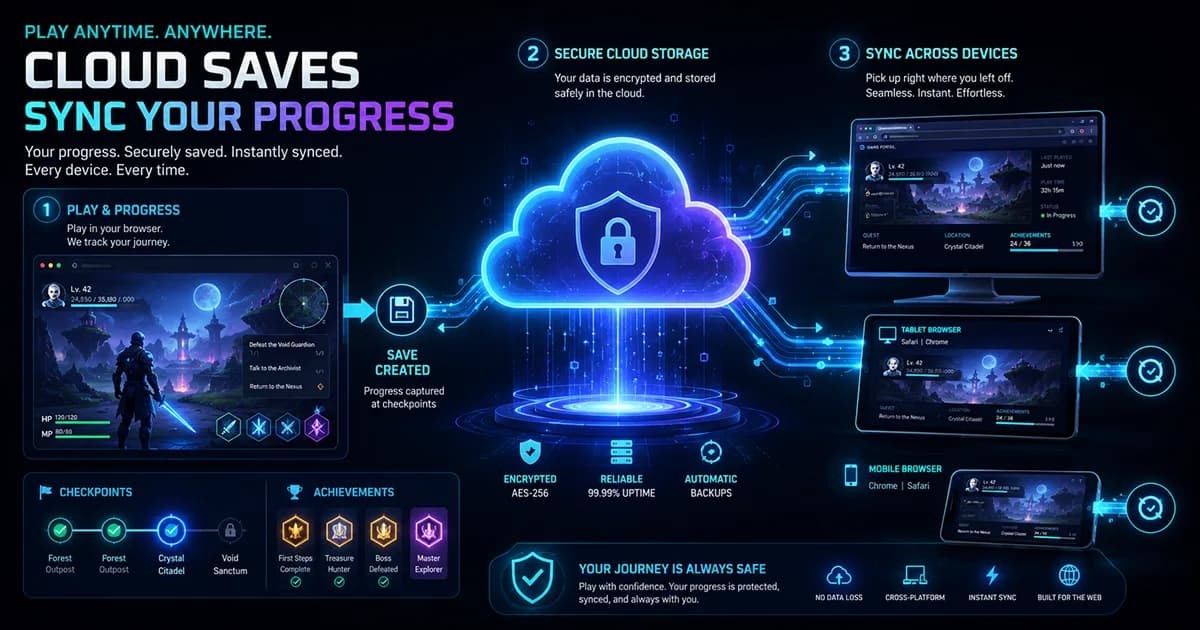
A local save usually needs help to travel anywhere, and that help comes from a player account. An account gives a game or platform a consistent identity to attach progress to, so the same player can be recognized on another supported device. This only works if the game or platform actually supports online saving in the first place, and if the player is signed into the game or platform itself, not just into the browser, since those are separate systems. Offline play adds another layer of complexity. A player might reach Level 8 on one device while offline, while a second device still holds an older Level 6 state from the last time it connected. When both devices reconnect, the system may need to decide which version of progress should become current, and different games resolve that kind of conflict in different ways, sometimes keeping the newer state, sometimes prompting the player to choose. It's generally a good idea to let a game finish saving or synchronizing before rapidly switching to another device, especially right after a major change in progress. Cross-device continuity is a feature that a game or platform has to deliberately build and support. It isn't an automatic property of every browser game, and its absence doesn't mean anything is broken.
Quick Reference
A few terms worth knowing when thinking about how browser games remember progress.
The specific information a game considers worth remembering, such as progress or settings.
Progress stored within the player's browser environment on a single device.
Data that a browser keeps on behalf of a website, including a game.
A browser database that websites can use to store more structured information on a device.
A saving approach where progress is recorded automatically as meaningful changes happen.
A specific point in a game where progress is intentionally recorded.
Progress stored on a remote server operated by the game or its platform.
The process of coordinating saved progress between different locations or devices.
Guide Complete
How can a browser game remember progress after the player leaves? The answer depends on what the game chooses to remember, when it creates a save, where that save is actually stored, how the player is identified, and whether the game supports synchronization at all. A local save keeps progress close to a single browser, convenient but not portable. An account-based or cloud save connects progress to a player identity, allowing it to follow that player to other supported devices, provided the game was built to support it. Understanding which system a particular game uses turns confusing moments, like missing progress or a fresh start on a new device, into something explainable rather than mysterious.
Local and account-based progress behave differently.
A stored save can remain after a normal session ends.
Cross-device progress depends on a supported identity and online save system.
Before clearing site data, changing browsers, or switching devices, understand how the specific game saves.
Guides
Learn the real differences between arcade, puzzle, and strategy games. Discover how each genre rewards different skills, suits different moods, and helps you choose the right game for every session.
Guides
Explore how online games evolved from early networked computer experiments into today's connected ecosystem of multiplayer worlds, browser games, mobile play, cross-platform experiences, and live online communities.
Guides
Learn how keyboard controls in browser games work, why layouts like WASD are so common, what popular gaming keys usually do, and how to troubleshoot common keyboard input problems while playing.
Guides
A practical guide to playing HTML5 browser games on smartphones and tablets, covering orientation, touch controls, performance, and how to fix common mobile gaming problems.
Continue Exploring
Jump into browser games or challenge yourself in Quiz Arena. There's always something new to discover.