01
HTML5 is not a game engine
The term HTML5 game usually describes games built with several modern web technologies working together, rather than a single programming language or engine.
No games found
Unihfy Games
Loading identity...
Quick Access
Discover what happens behind the scenes when an HTML5 browser game loads and runs. Learn how the browser downloads files, renders graphics, processes player input, plays audio, saves progress, and communicates with online services in this beginner-friendly guide.
Format
In-Depth Guide
Reading Time
15 min read
Published
July 8, 2026
Written by
Founder · Writer
Nikunj Hirpara founded Unihfy Games and decides what the site works on next. He writes the explanatory guides about how browser games work, and the geography and sports quizzes.
View Author ProfileBeginner Guide
Opening a browser game feels almost instant, yet dozens of coordinated processes begin working together before the first playable frame appears. The browser requests files from a server, downloads images, sounds, scripts, and fonts, prepares the page, initializes the game's systems, and starts a continuous loop that reacts to your input while drawing new frames many times each second. Modern HTML5 games are not powered by HTML alone. They combine technologies such as JavaScript, Canvas, WebGL, browser APIs, storage systems, and networking features to create interactive experiences that work across many devices. This guide follows that complete journey, explaining what happens from the moment a player opens a game URL until the game is running smoothly, helping you understand the technology behind modern browser games without requiring prior programming knowledge.
What the term HTML5 game really means and which web technologies work together to create one.
How a browser downloads, prepares, and initializes a game before gameplay begins.
How rendering, player input, audio, storage, and networking work together during gameplay.
Why performance optimization, browser APIs, and modern technologies such as WebAssembly matter for some games.
Quick Overview
The term HTML5 game usually describes games built with several modern web technologies working together, rather than a single programming language or engine.
Browser games avoid traditional installation, but they still download code, graphics, audio, fonts, and other assets before or during gameplay.
In many browser games, JavaScript manages game logic, updates the world, reacts to player actions, and coordinates rendering with browser APIs.
A game loop updates the game state and draws new frames continuously, allowing movement, animation, effects, and interactions to appear smooth.
Some interfaces use the DOM, many games use the Canvas 2D API, and more demanding graphics may use WebGL for hardware-accelerated rendering.
Keyboard, mouse, touch, and gamepad input are captured by the browser and passed to the game so it can respond in real time.
Games may store data only during the current session, save small amounts locally with localStorage, keep larger data in IndexedDB, or synchronize progress with online servers.
Each game chooses its own rendering techniques, networking model, storage strategy, and optimization methods based on its goals and technical requirements.
Chapter 01
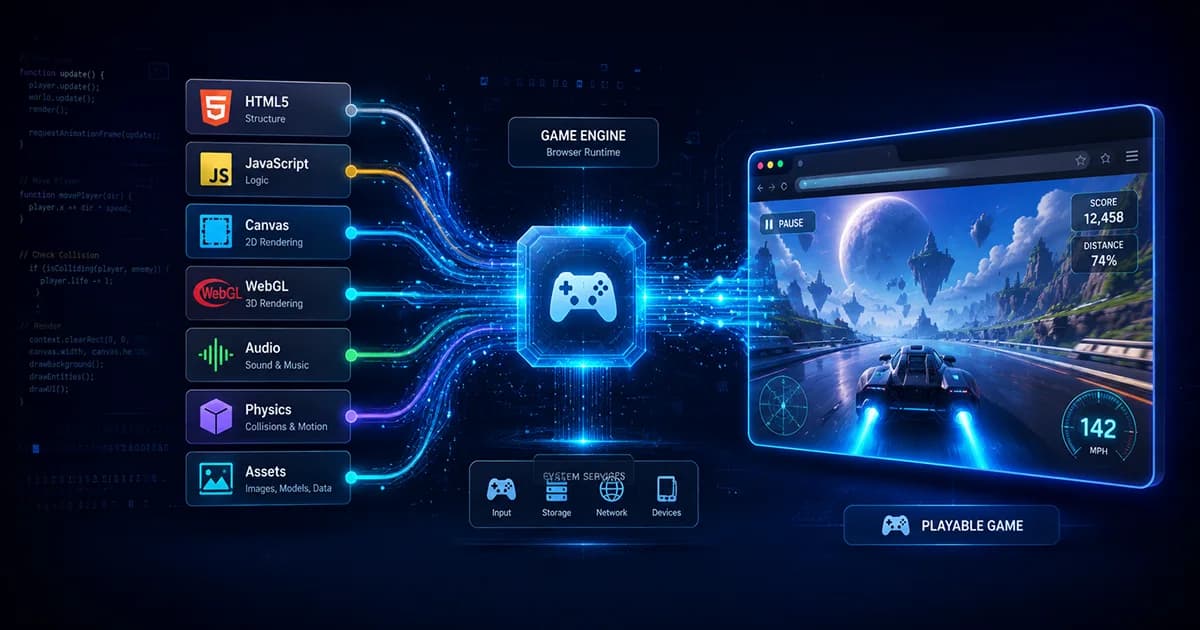
The name 'HTML5 game' can be misleading because HTML5 is not a dedicated game engine or a single technology that creates games on its own. Instead, it is a convenient term used for games that run inside modern web browsers using a collection of web technologies. Each technology has a different responsibility. HTML provides the structure of the page, CSS controls its appearance, JavaScript powers the game's logic, and browser graphics technologies such as Canvas or WebGL draw the visuals. Additional browser APIs handle sound, player input, storage, networking, and many other features. Together, these pieces create an interactive experience that players can launch by opening a web page rather than installing traditional desktop software.
The Big Picture
Rather than relying on a single component, browser games combine several technologies that each solve a different problem. Understanding their individual roles makes it much easier to understand how a complete game functions.
Creates the webpage that hosts the game, including containers for the game canvas, menus, score displays, loading screens, and other interface elements.
Controls the appearance of the page by styling buttons, menus, fonts, layouts, and responsive designs so the game looks good on different screen sizes.
Acts as the game's coordinator. It commonly manages rules, player actions, physics, enemy behavior, scoring, loading assets, and communication with browser features.
Provides a drawing surface where games can render sprites, backgrounds, particle effects, text, and animations efficiently without creating thousands of HTML elements.
Gives games access to hardware-accelerated graphics capabilities, making it suitable for advanced visual effects and many 3D experiences. Not every HTML5 game requires WebGL.
Modern browsers include built-in features for receiving keyboard, mouse, touch, and gamepad input, playing audio, storing data, making network requests, and much more.
Chapter 02
Clicking a game's URL may feel instantaneous, but several coordinated steps occur before the first playable screen appears. The browser contacts the server hosting the game, requests the webpage, discovers additional files that are needed, downloads them, prepares resources such as images and audio, and finally starts the game's initialization process. Depending on the game's size and design, some resources may load immediately while others are fetched later to reduce waiting time. Understanding this loading sequence helps explain why some browser games start almost instantly while larger titles display loading bars or splash screens before gameplay begins.
How It Flows
Although different games organize their resources differently, most HTML5 games follow a broadly similar startup sequence before the player gains control.
The journey begins when the player enters a web address or selects a game link. The browser sends a request asking the server for the game's webpage.
The server returns the HTML document. While reading it, the browser discovers references to JavaScript files, style sheets, images, fonts, sounds, and other assets required by the game.
The browser automatically requests the resources referenced by the page. These can include game code, sprite sheets, audio files, textures, configuration files, and user interface assets.
Downloaded files are decoded into formats the browser can use. Images become textures or sprites, audio files are prepared for playback, and fonts become available for interface rendering.
The game's code starts running. It creates important systems, loads settings, prepares menus, creates the first game objects, and checks whether saved progress or online account information is available.
After enough resources have been prepared, the game begins rendering its first interactive frame. The continuous game loop starts, allowing the player to control characters and interact with the world.
Chapter 03
Once a browser game has finished loading, many independent systems begin working together. Instead of one enormous block of code handling every task, games are usually organized into layers, with each layer focusing on a specific responsibility. Separating these responsibilities makes games easier to build, maintain, improve, and optimize. While every project has its own architecture, most HTML5 games include similar functional layers that cooperate throughout every frame of gameplay.
Under the Surface
Each layer contributes something different to the final experience seen by the player. Together they create a responsive, interactive browser game.
The browser displays the webpage containing the game. Menus, loading screens, score displays, settings panels, and other interface elements are often managed here using HTML and CSS.
This layer contains the rules that define how the game behaves. It updates characters, enemies, scoring, missions, inventory systems, and many other gameplay mechanics each frame.
The rendering system converts the current game state into visuals. Depending on the project, it may use the DOM, Canvas 2D, or WebGL to draw objects, effects, animations, and user interface elements.
Keyboard presses, mouse movement, touchscreen gestures, and gamepad controls are collected by the browser and translated into actions the game understands.
Background music, sound effects, ambient sounds, and volume management are handled here. Good audio timing helps make actions feel more responsive and immersive.
Depending on the game, this layer may save settings, unlocked achievements, player progress, or cached data using browser storage such as localStorage or IndexedDB.
Games with online features communicate with remote servers to authenticate players, synchronize multiplayer sessions, update leaderboards, retrieve new content, or save progress in the cloud.
Chapter 04
After the game has finished loading, it doesn't calculate everything only once. Instead, it enters a continuous cycle called the game loop. This loop runs repeatedly while the game is active, checking for player input, updating the game world, calculating movement and interactions, and drawing a new frame. Modern browser games commonly synchronize this process using requestAnimationFrame, a browser API that schedules rendering efficiently according to the display. Although every game structures its loop differently, the underlying idea remains the same: update the game's current state, render the latest scene, and repeat until the player exits the game.
How It Flows
A single frame represents one complete pass through the game loop. This process repeats many times every second to keep gameplay responsive and animations smooth.
The game checks whether the player has pressed keys, moved a mouse, touched the screen, or used a connected gamepad since the previous frame.
Characters move, enemies make decisions, timers advance, scores change, and other gameplay systems update according to the current rules of the game.
If the game includes movement, gravity, or collisions, it determines whether objects have touched each other and what should happen as a result.
Sprite animations, particle effects, user interface transitions, and other visual changes progress based on the elapsed time since the previous frame.
Using the latest game state, the rendering system draws characters, backgrounds, interface elements, lighting, and visual effects for the player to see.
The browser prepares for another cycle, often using requestAnimationFrame so rendering stays synchronized with the display whenever possible.
The Big Picture
The browser provides requestAnimationFrame to help games render efficiently. Rather than running at arbitrary intervals, it allows rendering to be coordinated with the browser's display updates, reducing unnecessary work and helping animations appear smoother.
Player actions are gathered before the game decides what should happen next.
Rules, AI, timers, inventory, and gameplay systems update using the newest information available.
Positions, health, scores, animations, and other game data are refreshed to reflect the latest events.
Canvas, WebGL, or another rendering method draws the newest version of the game world for the player.
requestAnimationFrame asks the browser to call the rendering function again at an appropriate time for the next visual update.
The cycle continues until the game is paused, closed, or reaches another state where rendering no longer needs to continue.
Checkpoint
Everything players experience during gameplay is powered by the game loop. Rather than processing the entire game at once, the browser repeatedly gathers input, updates the game's state, performs calculations, renders a new frame, and prepares to do it all again. This constant repetition creates the illusion of a living, responsive world.
The game loop keeps the game continuously updating while it is running.
Player input is processed before the game decides how the world should change.
Movement, collisions, AI, and animations are recalculated every frame.
Rendering produces a fresh visual representation of the latest game state.
requestAnimationFrame helps browsers schedule rendering efficiently, although individual game implementations may vary.
Continue the journey
Chapter 05
Once the game has calculated what should appear on screen, it needs a way to display those visuals to the player. Browser games can render graphics using several different approaches depending on their goals. User interfaces such as menus, buttons, and scoreboards are often built with standard HTML elements. Many 2D games draw directly onto a Canvas, while visually demanding games may use WebGL to access hardware-accelerated graphics capabilities. None of these approaches is universally better than the others; developers choose the one that best matches the game's requirements, visual style, and performance targets.
Under the Surface
Modern browser games often combine multiple rendering techniques instead of relying on only one. Each approach has strengths that make it useful for different parts of a game.
The Document Object Model (DOM) represents the webpage itself. Interface elements such as menus, health bars, settings panels, chat windows, and buttons are commonly built with HTML and CSS because they are easy to style and interact with.
Canvas provides a blank drawing surface where JavaScript can continuously redraw the game. Sprites, backgrounds, particle effects, projectiles, and animations are painted frame by frame, making Canvas a popular choice for many 2D browser games.
WebGL exposes hardware-accelerated graphics capabilities through the browser, allowing games to render complex scenes, lighting, shaders, and many 3D environments. It offers greater graphical power but also increases development complexity compared with basic Canvas rendering.
Instead of drawing every object from scratch, games frequently reuse prepared images called sprites or textures. These assets are loaded into memory and rendered repeatedly at different positions, rotations, or scales throughout gameplay.
Every frame combines backgrounds, characters, effects, user interface elements, and text into one complete scene before the player sees the final result on the screen.
Chapter 06
A game becomes interactive only after it can respond to the player's actions. Browsers constantly monitor input devices such as keyboards, mice, touchscreens, and supported gamepads. Instead of directly moving a character, these devices generate events that the browser passes to the game's code. The game interprets those events according to its own rules. For example, pressing the same key might make one character jump in a platform game, accelerate a vehicle in a racing game, or open a menu in a strategy game.
The Big Picture
Every control follows a similar journey from the player's hands to the game's logic. The browser captures the interaction before the game decides how to respond.
Key presses and releases are detected by the browser and forwarded to the game, allowing actions such as movement, jumping, attacking, or opening menus.
Mouse movement, clicks, wheel scrolling, and button presses help control aiming, camera movement, interface navigation, and object selection.
On phones and tablets, taps, swipes, pinches, and multi-touch gestures provide an alternative to traditional keyboard and mouse input.
Pointer Events provide a unified way for developers to work with mouse, touch, and stylus input through a common programming model, reducing the need for separate handling in many situations.
Supported controllers can communicate with compatible browser games, allowing buttons, triggers, and analog sticks to trigger gameplay actions in much the same way as console games.
After receiving the input, the game's own rules determine what actually happens, ensuring that identical inputs can produce different outcomes in different genres and gameplay situations.
Chapter 07
Graphics are only part of what makes a browser game feel alive. Sound effects provide feedback, music creates atmosphere, and animations make movement appear natural instead of abrupt. Behind the scenes, the browser coordinates these systems with careful timing. Rather than assuming every device renders at the same speed, many games measure the time between frames so movement remains consistent on both slower and faster hardware. This combination of audio, animation, and timing helps deliver a smoother and more responsive gameplay experience.
Under the Surface
Several browser technologies work together to ensure that actions look smooth, sound responsive, and remain synchronized throughout gameplay.
Short sounds confirm player actions such as jumping, collecting items, firing weapons, or opening menus. Immediate audio feedback helps actions feel more satisfying and responsive.
Music establishes the mood of a game and can change dynamically between exploration, combat, menus, or important story moments depending on the game's design.
Many browser games use the Web Audio API to control playback, volume, mixing, looping, spatial positioning, and audio effects with greater flexibility than basic audio playback alone.
Characters, interface elements, particle effects, and environmental objects update their animations according to elapsed time rather than assuming every frame takes exactly the same amount of time.
Frame rate describes how many frames are displayed each second. Higher frame rates can produce smoother motion, but the exact result depends on both the game and the player's device.
Delta time measures the time between consecutive frames. Many games use it so movement speeds remain consistent even when frame rates fluctuate across different hardware.
Chapter 08
Not every browser game remembers your progress after you close the tab, but many do. Developers can choose from several storage methods depending on the amount of data they need to save and whether players have online accounts. Some information exists only while the game is open, while other data can remain stored inside the browser or on remote servers. Each approach has advantages and limitations, so different games often combine multiple storage techniques.
The Big Picture
Progress can exist in temporary memory, inside the browser, or on remote servers. The choice depends on how much information needs to be stored and whether players should be able to access it across multiple devices.
Information kept only in memory exists while the game is running. Unless it is saved elsewhere, this data disappears when the page is refreshed or the browser is closed.
localStorage is useful for relatively small pieces of information such as settings, high scores, completed tutorials, or simple progress that should persist between browser sessions.
IndexedDB provides a more powerful browser database capable of storing larger and more structured data, making it suitable for complex save files, cached assets, or offline content.
Games with online accounts can send save data to remote servers, allowing progress to be synchronized across multiple devices after the player signs in.
Browser storage is not permanent. Players may clear browser data, switch devices, or use private browsing modes where stored information behaves differently or is removed automatically.
Developers often combine several storage approaches, using local storage for quick access while synchronizing important progress with online services whenever appropriate.
Chapter 09
Many HTML5 games are entirely self-contained, but others communicate with online services while you play. A browser game may contact servers to verify player accounts, retrieve leaderboards, download new content, save progress, or synchronize multiplayer matches. The browser acts as the client, sending information to remote servers and receiving responses. Exactly how this communication works depends on the game's design, but the overall goal is always to keep the player's experience accurate, responsive, and up to date.
How It Flows
Different games use different networking architectures, but many online features follow a similar sequence of communication between the browser and remote services.
The player signs in, joins a multiplayer match, opens a leaderboard, or performs another action that requires information from an online service.
The game client packages the required information and sends it across the internet to the appropriate game server using the networking methods chosen by the developers.
The server validates requests, updates player information, checks game rules, retrieves stored data, or coordinates interactions between multiple connected players.
Fast-paced multiplayer games often benefit from persistent communication technologies such as WebSockets so information can move quickly in both directions. Other games may use different networking approaches depending on their requirements.
The browser receives the server's response and updates scores, player positions, inventories, matchmaking status, achievements, or other online information.
As long as the player remains connected, this communication cycle repeats whenever the game needs fresh information from its online services.
Checkpoint
The browser does not perform every task by itself. Many games rely on remote servers for authentication, multiplayer synchronization, cloud saves, events, and leaderboards. The browser and server continuously exchange information, allowing players to enjoy connected experiences while the game itself continues running locally.
The browser usually acts as the game client while servers provide online services.
Not every browser game requires an internet connection after loading, but online features do.
Persistent communication methods such as WebSockets are useful for many real-time multiplayer games, though they are not the only solution.
Servers help keep shared player information consistent across different devices and users.
Multiplayer architecture varies widely depending on the type of game being built.
Continue the journey
Chapter 10
A browser game that runs smoothly on one device may struggle on another. Desktop computers, laptops, tablets, and smartphones differ in processing power, graphics capability, available memory, screen size, battery limits, and network quality. Because of these differences, developers spend significant effort optimizing assets and adapting gameplay so the same game can provide a good experience across a wide variety of browsers and hardware.
Myth vs Reality
The Myth
Browser games require no downloading at all.
The Reality
Most browser games still download code, images, sounds, fonts, and other assets. The difference is that players usually do not perform a traditional software installation.
The Myth
Every browser runs every HTML5 game exactly the same way.
The Reality
Browser support, hardware acceleration, graphics drivers, and device performance all influence how a game behaves on different systems.
The Myth
A mobile browser game is just the desktop version on a smaller screen.
The Reality
Developers often redesign layouts, controls, asset loading, and performance settings to better suit touchscreens, smaller displays, and lower-powered hardware.
The Myth
Large assets always improve visual quality.
The Reality
Oversized images and audio files increase loading times and memory usage. Well-optimized assets often provide an excellent balance between quality and performance.
The Myth
Optimization only matters after the game is finished.
The Reality
Many successful browser games consider performance throughout development by compressing assets, reducing unnecessary work, loading resources gradually, and adapting to different devices.
Chapter 11
JavaScript powers many browser games, but it is not the only technology available for performance-critical tasks. Some developers also use WebAssembly, often abbreviated as Wasm, to run code compiled from languages such as C, C++, or Rust. Rather than replacing JavaScript, WebAssembly works alongside it. JavaScript still commonly manages browser interaction and many gameplay systems, while WebAssembly can accelerate specific calculations when a project benefits from additional performance. Many successful HTML5 games never use WebAssembly at all, making it an optional tool rather than a requirement.
Under the Surface
Instead of replacing the browser's existing technologies, WebAssembly becomes another layer that can assist with demanding workloads when appropriate.
JavaScript continues to interact with browser APIs, handle user input, manage many gameplay systems, and coordinate communication between different parts of the application.
WebAssembly can execute computationally intensive tasks efficiently, making it attractive for some game engines, simulations, and complex processing workloads.
WebAssembly does not directly replace browser features. It cooperates with JavaScript, which typically continues handling rendering, networking, storage, and other browser interactions.
Many browser games perform extremely well using only JavaScript and standard web technologies. Whether WebAssembly is beneficial depends on the goals and technical requirements of the project.
Quick Reference
These are some of the most important terms you'll encounter when learning how modern HTML5 browser games work.
A collection of modern web standards used alongside other technologies to build browser-based applications and games.
The programming language commonly used to control game logic, interaction, and browser behavior.
A browser drawing surface used to render graphics directly through code.
A browser graphics API that provides hardware-accelerated rendering for advanced 2D and 3D graphics.
The repeating cycle that updates the game state and renders new frames while the game is running.
A browser API that helps schedule rendering in coordination with the display.
The number of visual frames displayed each second.
The elapsed time between consecutive frames, often used to keep gameplay consistent across different hardware.
Any resource used by the game, including images, sounds, fonts, videos, and data files.
An image resource applied to objects or used during rendering to display visual detail.
Browser technology for advanced sound playback, mixing, and audio processing.
Browser storage designed for relatively small pieces of persistent data.
A browser database capable of storing larger and more structured information.
A communication technology that enables persistent two-way connections between browsers and servers.
A binary instruction format that allows compiled code to run efficiently inside modern web browsers alongside JavaScript.
Guide Complete
An HTML5 game is much more than a webpage with moving graphics. From the moment a player opens a game URL, the browser begins downloading resources, preparing assets, initializing systems, processing input, updating game logic, rendering graphics, playing audio, storing data, and, when needed, communicating with online services. Although individual games differ in architecture and technology choices, they all combine multiple browser capabilities to create responsive interactive experiences without requiring traditional installation.
Modern browser games combine HTML, CSS, JavaScript, graphics APIs, storage, networking, and browser features rather than relying on HTML alone.
Continuous updates, rendering, and input processing allow browser games to remain responsive while the player interacts with the world.
DOM, Canvas, and WebGL each solve different rendering problems, and many games combine them to achieve the best results.
Some games save data locally, others synchronize progress online, and multiplayer features rely on server communication designed for each game's specific needs.
Optimized assets, efficient rendering, appropriate storage strategies, and thoughtful use of browser technologies help HTML5 games perform well across many different devices.
Guides
Explore the complete history of browser games, from the earliest web experiments and Java applets through the Flash era, online game portals, HTML5, WebGL, WebAssembly, mobile browsers, and the technologies shaping modern browser gaming.
Guides
Discover why browser games can run without traditional downloads or installation. Learn what the browser actually loads, how game resources are delivered, how browser caching works, and how browser games differ from installed software.
Guides
Learn how Unihfy Games tests browser games by checking first launch, controls, gameplay, objectives, progression, browser behavior, and the accuracy of player-facing information before publishing guides and reviews.
Guides
Learn the fundamentals of puzzle games with this beginner-friendly guide. Discover the main puzzle types, practical solving strategies, common mistakes to avoid, and simple habits that help you improve over time.
Continue Exploring
Jump into browser games or challenge yourself in Quiz Arena. There's always something new to discover.