Unihfy Games

Lobwick

Lobwick

SportsBasketballPassingTimingSeason ModeTacticsTouch GesturesSingle Player

Games > Lobwick

Play Lobwick • Free

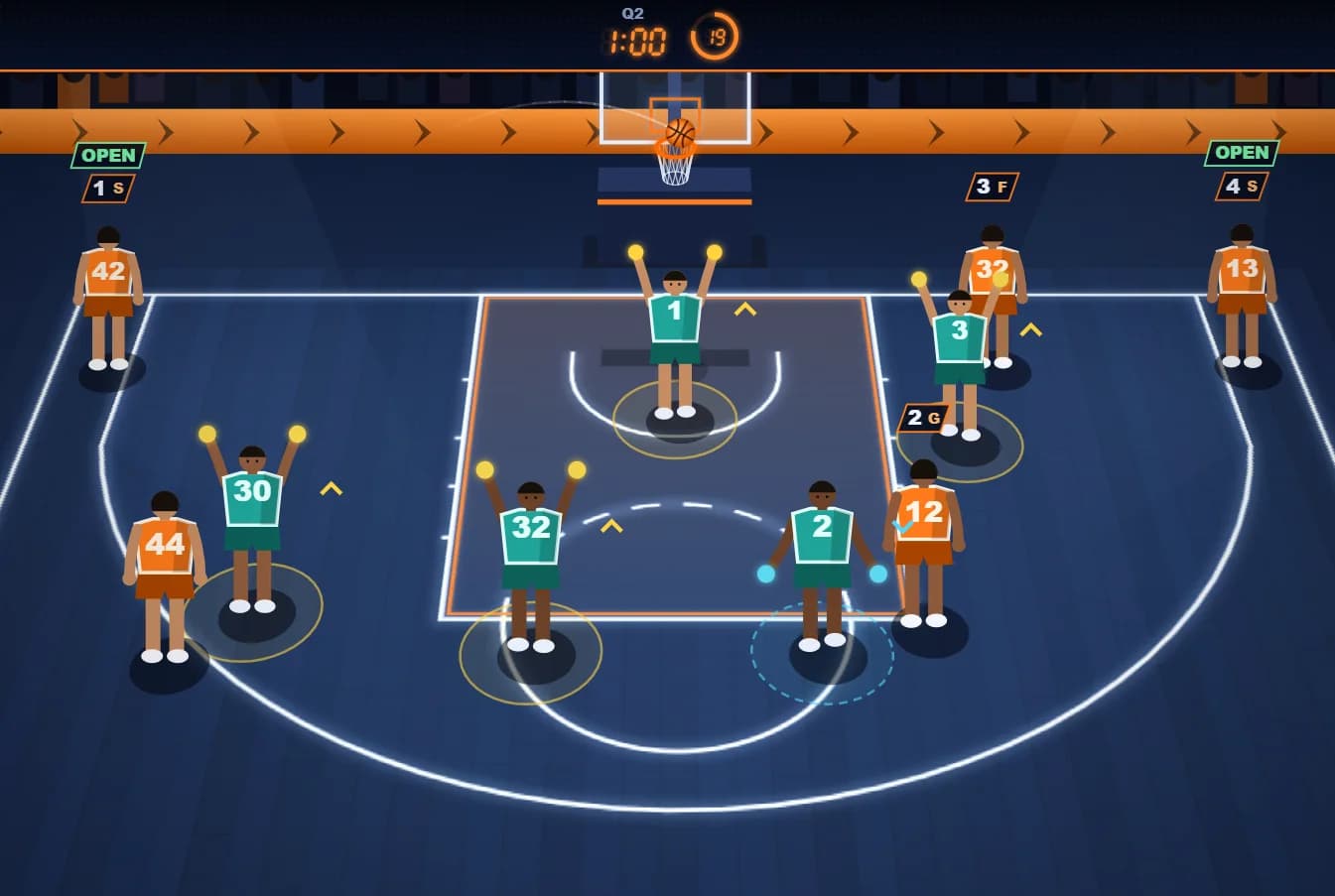
Night-court basketball where you never steer a player: you only decide who gets the ball and how. Tap a teammate for a chest pass, flick down for a bounce pass or flick up for a lob, and pick the one the defenders' hands can't stop. Those hands switch between up and low on a beat, so the right pass at the wrong moment still gets stolen. Good ball movement builds a better shot: hold the ball handler to rise and let go when the release meter hits the green. Watch from a low camera that runs behind the ball or a wide view of the whole half court, and play a season of eight matches against invented rivals, each with its own defence. Outscore them over four quarters, and win five of the eight to take the season's title.

Genre: Sports

Difficulty: Easy to learn, harder with every rival and every season

About Lobwick

A season of eight rivals

Every team you meet was made up for Lobwick, and each defends in its own way. The Harbor Owls play steady man-to-man. The Saltmarsh Otters sit in a 2-3 zone, and the Mosswood Elks in a 3-2 zone, so the gaps are in different places. The Copperfield Stags deny every catch, the Lantern Bay Gulls switch on every screen instead of getting caught on it, and the Ironside Foxes send two defenders at the ball after a catch, which always leaves someone open. The Ember Valley Kites press so hard you only get 20 seconds on the shot clock, and the Brightwater Cranes mix it all up with the fastest hands in the league.

You meet them in order, each one a little quicker on the beat than the last. Win five of the eight and the season's title is yours; the season board shows how many titles you've won. Finish the season and a new one starts, where every rival's hands switch faster, give a shorter warning, and score more often on their own possessions.
How a match plays

Your goal in every match is to outscore the rival over four quarters of 90 seconds on the game clock, with a 45-second overtime whenever the score is level at the end. The scoreboard shows your lead or how far behind you are. The game clock runs while the ball is live on your possession, and each of your possessions has a 24-second shot clock.

Between your possessions the rival has the ball, and you see it played on the court: their five, in their colours, attack the same hoop while yours defend. They pass it round two or three times and then shoot, and how often they score depends on how good that team is on offence. It takes about five seconds, and a tap skips straight to the result. Each of your own possessions starts from a new formation, and your teammates run set pieces from it: cuts to the basket, screens, flares to the wing, swaps, post-ups and give-and-go cuts after a pass. A tag marks any teammate who is open.

Building a good shot

How much green the release meter gives you depends on the shot you've built. A shot with no pass at all is cold, with a small window; each completed pass opens it up, and shooting within a second of a catch is in rhythm, for a bigger window still. Close to the rim gives the most time, deep shots the least, and a defender nearby takes some away, which the meter shows as a striped stretch in the colour of their hands.

Each of your five has a role, shown by the letter on their badge: a guard, a shooter, a wing, a forward and a center. Shooters are best from deep, centers and forwards near the rim, wings from the middle, and a tag under the ball handler sums up the shot from where they stand: their role, whether it's worth 2 or 3, and whether it's cold, in rhythm, open or guarded. Rise next to a defender whose hands are raised and the shot can be blocked.

When you let go, the meter holds where you released and calls it PERFECT, GOOD, EARLY or LATE. A release in the white core is a swish; the rest of the green goes in; just outside it rattles in or rims out; further out falls short or long, and holding on far too long is an airball.

Two ways to watch

The close view is a low camera that runs behind the ball and looks up the court at the hoop, so the shooter and the rim are always in shot. The wide view sits high behind your team and shows the whole half court at once. Switch with the VIEW button or the V key at any time during play; phones start in the close view and computers in the wide one, and your choice is remembered.

In the close view some teammates will be off screen. An arrow on the edge of the screen points to each of them with their number and role, turning green when they're open and red when a pass to them would be stopped right now. Tap or flick on the arrow just as you would on the player.

Learning by playing

There are no instruction screens. The first possession of your first match is coached on the court: a banner walks you through a chest pass, a bounce pass, a lob and a shot, one at a time, and a glowing ring marks the teammate for whom that pass is safe right now. The banner moves out of the way so it never covers the ball handler or the meter, the shot clock waits until you've finished, and a SKIP button lets you start playing straight away. Choose COACH ME on the title screen to go through it again at any time.

What the game keeps

Your season number, the result and score of every game this season, your best score in a single game, how many titles you've won, whether you have been coached, your sound setting and your camera view are saved on Unihfy Games in this browser.

Your score here is the number of points your team scores in a match. Leaving a match from the timeout menu doesn't count as a loss.

Reviewed By
Kaushik Hirpara

Developer · Game Reviewer

Kaushik Hirpara is a full-stack developer and game reviewer at Unihfy Games. He does most of the work of bringing games to the site — adapting them to run properly in a browser, getting them working on phones, playing them, and writing up what players need to know.

View Profile
Game Created By

Unihfy Games

Lobwick is an original game created and published by Unihfy Games. We continue to improve it with new features, gameplay enhancements, and platform optimizations.

Designed and built in-house by Kaushik Hirpara at Unihfy Games. All code, art and sound are original.

Proprietary SoftwareAll game credits

How to Play

  • You play offence and never move a player yourself. Your teammates run their own cuts, screens and swaps; your job is to pick who gets the ball, how it gets there, and when someone shoots. The hoop is always ahead of you, at the top of the screen.
  • Every defender's hands are either up (yellow) or low (blue). Raised hands block a chest pass, low hands steal a bounce pass, and a lob floats over everyone but can be picked off by raised hands near the teammate catching it. Pass with a tap for a chest pass, or press the teammate and flick down for a bounce pass or up for a lob. Changed your mind while pressing? Drag onto CANCEL, or press F, and no pass is made.
  • The hands switch on a team beat, and each defender shows a smooth tell just before a switch: their arms start to move and the colour of their glow begins to change. Read the tell and pass into the beat that is coming, not the one you see. On desktop, hovering a teammate shows where the pass would go and warns you if it's risky.
  • To shoot, press and hold the ball handler. They rise and a release meter fills up beside them; let go while the cursor is in the green. The white core of the green is a swish. Moving the ball first makes the green bigger, and a defender close by shrinks it, most of all with hands up. Shots from beyond the arc or from either corner score 3.
  • Lob to a teammate near the rim and tap again late in the ball's flight to finish with an alley-oop slam. Watch the shot clock: if it runs out, or a pass is stolen or a shot is blocked, the rival runs a fast break the other way and scores 2. A missed shot is the rival's rebound.

Gameplay Preview

Features

Three passes, chest, bounce and lob, each beaten by different hands
Defenders whose hands switch on a beat, with a readable tell before every switch
A release meter whose green grows with good ball movement and shrinks under a close contest
Five roles, from shooters who love the arc to centers who live at the rim, and shots that can be blocked
Swishes, rattlers, rim-outs, short and long misses and airballs, plus alley-oop slams
Teammates who run cuts, screens, flares, post-ups and give-and-go plays by themselves
A close camera that runs behind the ball and a wide view of the whole half court, with edge arrows for teammates out of shot
Rival possessions played out on the court in their own colours, which you can skip
Eight invented rivals with eight defences, from man-to-man and zones to traps and a full-court press
Four-quarter matches with a game clock, a 24-second shot clock, overtime and the lead on the scoreboard
A season schedule board and a title for every winning season, with each new season tougher than the last
A coached first possession instead of instruction screens
Court, players, crowd and scoreboard all drawn in code, with original synthesised sound
Full keyboard and mouse controls on desktop, and touch gestures on phones
Plays in portrait or landscape on phones, and in any window size on desktop

FAQs

Can I move my players?

No. Your teammates move by themselves, running cuts, screens and other set pieces. You choose who gets the ball, what kind of pass it is and when to shoot.

Which pass should I use?

Look at the hands between you and your teammate. Raised (yellow) hands block a chest pass, so bounce it under them. Low (blue) hands steal a bounce pass, so pass over them with a chest pass. A lob goes over everyone, but raised hands close to the catch can still pick it off.

How do I know when the hands will switch?

They switch on the defence's beat, and just before each switch a defender's arms start moving towards the new position and their glow starts changing colour. Each rival keeps its own beat, and later rivals switch faster with less warning.

How do I shoot?

Press and hold the ball handler (or hold Space). The player rises and a release meter fills up beside them. Let go while the cursor is in the green; the white middle of the green is a swish. Letting go too early or too late makes the shot miss short, long or off the rim, and holding on far too long is an airball.

Why is the green on the meter so small?

Either the shot is cold or a defender is close. Shooting without passing first gives the smallest window, so move the ball and shoot soon after a catch. A defender nearby takes some of the green away, shown as stripes in the colour of their hands, and a shooter's role matters too: a center from deep has very little green.

Can I change my mind after starting a pass or a shot?

Yes, as long as you haven't let go. On a phone, tap CANCEL with a second finger or drag onto it and lift; on a computer, press F. The shooter comes back down with the ball. A pass already in the air or a shot already released can't be called back.

What do the arrows at the edge of the screen mean?

In the close view, each arrow points to a teammate who is out of shot, with their number and role. Green means they're open, red means a pass to them would be stopped right now. Tap or flick on the arrow to pass to them.

How do I do an alley-oop?

Lob the ball to a teammate who is close to the rim, then tap anywhere (or press Space) late in the ball's flight, when the TAP tag shows. Tap too early and the chance is gone.

What happens if a pass is stolen?

The rival runs a fast break the other way and scores 2 points, and the clock moves on. The same happens if your shot is blocked or the shot clock runs out before you shoot.

How do I win?

Score more than the rival over four quarters to win the match; a tie goes to overtime. Win five of the season's eight matches to take the title. The scoreboard shows your lead during a match, and the title screen and season board show how many titles you've won.

How does the season work?

You play the eight rivals in order, one match each. The schedule board shows every result. When the season is over, a new one starts where every rival is a little sharper.

Can I play on my phone?

Yes, in portrait or landscape. Tap, press-and-flick and hold gestures are all made on the players themselves, or on their arrows when they're out of shot. On a computer it works in any window size, with mouse or keyboard.

Is my progress saved?

Yes. Your season, results, best score, titles, sound setting and camera view are kept in this browser on Unihfy Games. Clearing your browser data removes them.

Who made Lobwick?

Lobwick was designed and built in-house at Unihfy Games by Kaushik Hirpara. Its code, art and sound are all original, the teams are invented, and everything you see and hear is generated by the game itself.

More like this

Ready for a New Challenge?

Take on exciting quizzes, improve your general knowledge, earn XP, collect rewards, maintain your daily streak, and compete with players on the Quiz Arena leaderboard.

Go to Quiz Arena