Astray 3D Maze
Games > Astray 3D Maze
Play Astray 3D Maze • Free
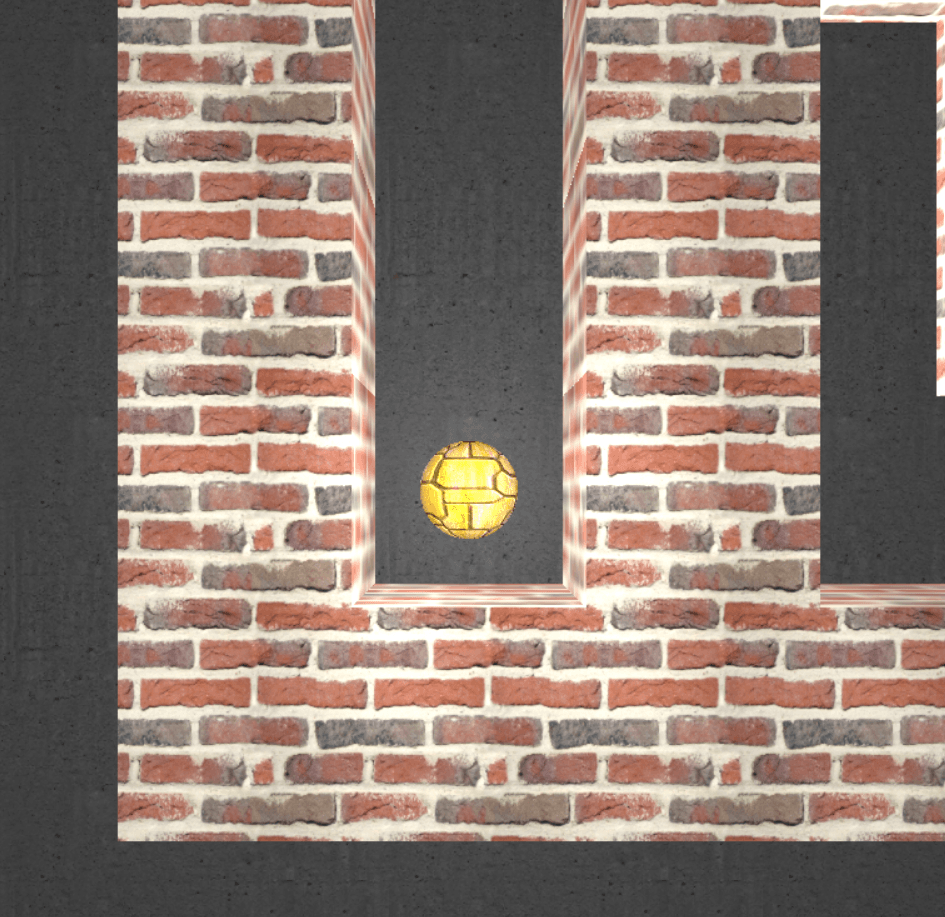
Navigate a physics-based ball through procedurally generated 3D mazes and escape to the exit. Each level gets bigger and more challenging as you master the controls and momentum-based movement.
Genre: Puzzle/Skill Action
Difficulty: Easy to Hard
Developer · Game Reviewer
Kaushik Hirpara is a full-stack developer and game reviewer at Unihfy Games. He does most of the work of bringing games to the site — adapting them to run properly in a browser, getting them working on phones, playing them, and writing up what players need to know.
Astray 3D Maze was originally created by Rye Terrell and is published here under its original licence terms. We host and maintain this version, with our own improvements for gameplay, browser compatibility, and mobile devices, while preserving the required attribution.
A WebGL maze game built with Three.js and Box2dWeb, released into the public domain by its authors. Additional contributions from Pavan Shankar Koli and Danylo Vashchilenko.
How to Play
- 1. Watch the fade-in animation that begins each level
- 2. Use arrow keys or WASD to apply force to the ball in any direction
- 3. The ball will roll and respond to momentum - plan your movements carefully
- 4. Navigate through the winding maze passages to find the exit corridor
- 5. Reach the exit point in the top-right area of the maze to advance
- 6. Each new level features a larger, more complex maze layout
- 7. Use the level indicator in the top-left to track your progress
- 8. Watch out for narrow passages and dead ends that require precise control
Gameplay Preview
Features
FAQs
How do I move the ball?
Press the arrow keys (or WASD) to apply force to the ball. Hold a key to keep pushing in that direction. The ball will accelerate and build momentum, so timing your inputs is important. Release to let momentum carry you forward.
Why does the ball keep rolling after I release the key?
The ball has realistic physics with momentum and friction. When you apply force, the ball speeds up and continues rolling even after you stop pressing. This is intentional - learning to control momentum is the core skill of the game. Small adjustments help you steer.
What's the goal of each level?
Navigate your ball through the maze to reach the exit, which is always located in the top-right corner. When you reach it, the level fades out and a new, larger maze is generated. There's no time limit - take as long as you need.
Do the mazes get harder?
Yes! Each level generates a bigger maze with more complex pathways. As the maze expands, you'll encounter longer corridors, trickier dead ends, and more intricate passages. Later levels require serious precision and planning.
Can I get stuck in a dead end?
No. Every randomly generated maze is guaranteed to have a valid path to the exit - there are no unsolvable mazes. However, you might roll into a narrow corner and struggle to escape, which requires careful momentum management to reverse course.
What do the controls H, J, K, L do?
These are Vim editor navigation keys for advanced players. H moves left, J moves down, K moves up, and L moves right. They work exactly like the arrow keys - some players find them more comfortable or faster than arrow keys.
Is there a way to see the entire maze layout?
The camera follows the ball as you move through the maze. You'll discover the layout gradually as you explore. There's no map view - part of the challenge is learning the maze structure through trial and error as you navigate.
What happens if I fall off the edge of the maze?
There are no edges to fall off! The play area extends far beyond the visible maze, giving you plenty of room to maneuver and recover from mistakes. You can't fall out of the level.
Can I reset or restart a level?
The current version doesn't have a manual reset button. However, you can refresh your browser to restart from Level 1. Each time you play, you'll get a brand new maze layout.
How is the difficulty calculated?
Difficulty is based on maze size, which increases by 2 units per level. This means more paths, longer distances, and more complex decision points. The physics remain the same, but larger mazes with more branching paths create exponentially harder puzzles.
More like this

Ready for a Challenge?
Play quizzes, earn XP, collect rewards and climb the leaderboard.
Go to Quiz ArenaMore like this


Ready for a New Challenge?
Take on exciting quizzes, improve your general knowledge, earn XP, collect rewards, maintain your daily streak, and compete with players on the Quiz Arena leaderboard.
Go to Quiz Arena