Defender
Games > Defender
Play Defender • Free
Command your forces in this strategic tower defense game where you build towers, manage resources, and defend against escalating waves of enemies across multiple maps and difficulty levels. Deploy 10 unique tower types with special abilities, earn gold from kills, and survive the ultimate onslaught.
Genre: Tower Defense
Difficulty: Progressive (Easy to Expert)
Developer · Game Reviewer
Kaushik Hirpara is a full-stack developer and game reviewer at Unihfy Games. He does most of the work of bringing games to the site — adapting them to run properly in a browser, getting them working on phones, playing them, and writing up what players need to know.
Defender was originally created by Tomás Malbrán and is published here under its original licence terms. We host and maintain this version, while preserving the required attribution.
How to Play
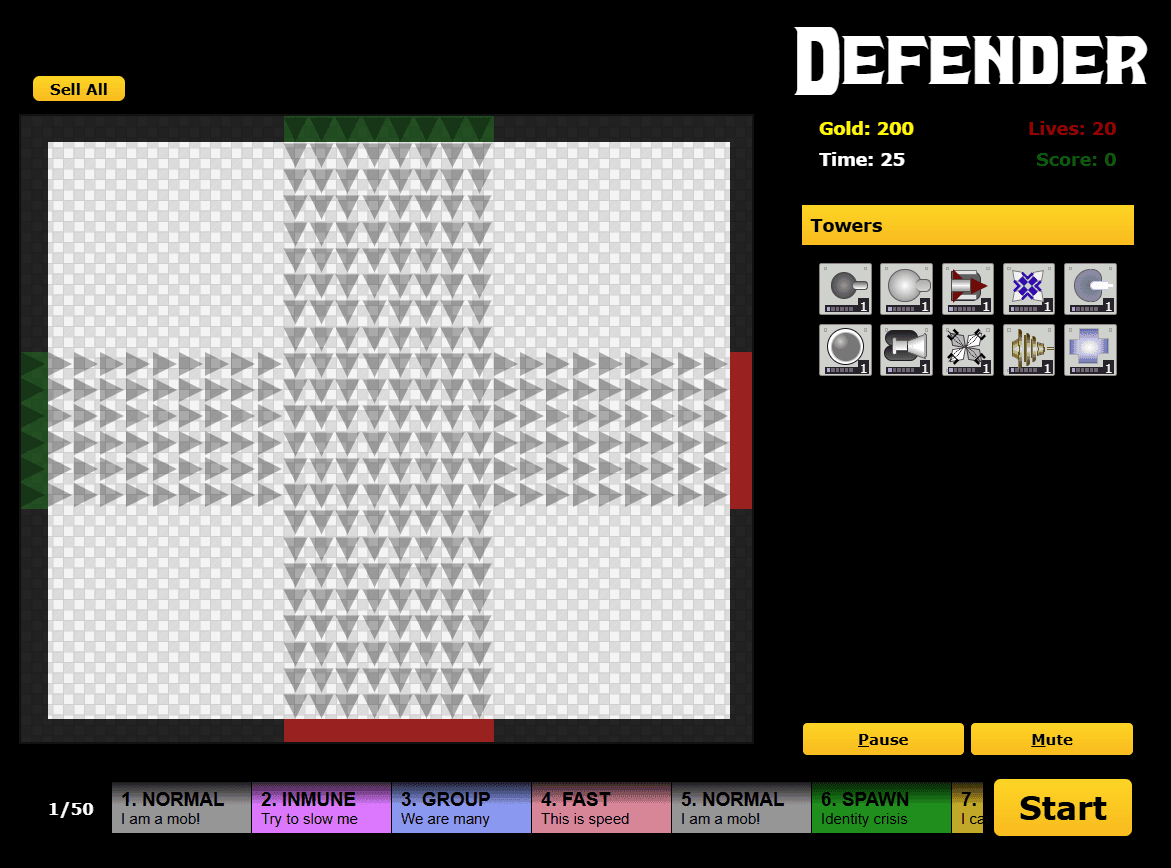
- Start by selecting a map from the New Game menu, then choose your difficulty level: Easy, Normal, or Hard. More difficult levels provide higher rewards but tougher enemies.
- You begin with 200 gold, 20 lives, and a 25-second timer before the first wave. Use this planning time to build initial defenses.
- Select a tower type from the sidebar or use number keys (0-9) to quickly choose. Move the green preview box using arrow keys to position your tower.
- Press B or click to place your tower. Each tower has a different cost, range, damage, and special abilities. Choose placement carefully to cover the enemy paths.
- Enemies will follow predetermined paths across the map. Your towers automatically shoot enemies within their range. Each kill grants gold bonuses.
- Use earned gold to build more towers and upgrade existing ones. Each tower can be upgraded 6 levels, increasing damage, range, and speed.
- Some towers have special abilities: Frost slows enemies, Laser deals massive damage in a line, Anti-Air targets flying enemies, Boost enhances nearby towers.
- Press N or click the Next Wave button to spawn the next wave when ready. As waves progress, enemies become more numerous and powerful.
- Different enemy types require different strategies: Normal enemies are balanced, Fast enemies move quickly, Immune enemies resist certain damage types, Flying enemies bypass some towers.
- If an enemy reaches the end of the path (marked by a target), you lose 1 life. Lose all 20 lives and it's Game Over.
- Later waves include Boss enemies - extremely tough units that require concentrated firepower. Prepare your best defenses for these encounters.
- Sell towers (S key) to recover partial gold investment if you need to rebuild your strategy. Lock towers (L key) to prevent accidental sales.
- Continue defending through all 22+ waves. Your final score depends on remaining lives, bonus time, and total gold earned.
- Compete for high scores on each map and difficulty combination. Restart and try different tower strategies to optimize your defenses.
Gameplay Preview
Features
FAQs
What happens if an enemy reaches the end of the path (the target)?
You lose 1 life. You start with 20 lives total. If you lose all 20 lives, it's Game Over and the game ends. As waves progress and enemies become more numerous, keeping enemies from escaping becomes increasingly challenging, so good tower placement is critical.
How do I earn gold to buy more towers?
Each time one of your towers kills an enemy, you earn a gold reward. Larger or tougher enemies give more gold when defeated. Defeating bosses yields significant gold bonuses. The higher the difficulty level you play on, the more gold you earn per kill. Use this gold to build new towers, upgrade existing ones, or rebuild if waves overwhelm you.
Can I upgrade a tower multiple times, and what do upgrades do?
Yes! Each tower can be upgraded up to 6 levels maximum. With each level, the tower gains improvements in damage (sometimes 2x per level), firing range, or attack speed depending on the tower type. Higher level towers are significantly more effective. Upgrades cost progressively more gold (5→10→20→40→80→200 for Shoot Tower).
What's the difference between the three difficulty levels?
Easy mode reduces enemy health and damage by about 30%, making it suitable for learning tower placement and mechanics. Normal mode provides balanced challenge with standard enemy stats. Hard mode increases enemy health and damage by 30%+ making enemies significantly tougher, but also rewarding higher gold income. Your score scales with difficulty.
Why can't I hit flying enemies with my regular towers?
Flying enemies travel above the ground and bypass most tower attacks. Only Anti-Air towers are specifically designed to target flying enemies, and some area-effect towers like Missile towers can hit them. You must build Anti-Air towers to defend against flying waves, or use towers with splash damage effects.
What does the Boost Tower do if it doesn't attack enemies?
The Boost Tower doesn't fire weapons but instead enhances all nearby towers within its range. Towers near a Boost Tower receive increased damage output and faster firing speeds. Position Boost Towers in central locations surrounded by your main defensive towers for maximum effect. It's a strategic support unit.
Can I sell towers I've already built?
Yes! Press the S key to sell the currently selected tower, or A to sell all towers. You receive a partial refund of the gold you spent (typically 50-75% of the cost). This lets you rebuild your strategy if waves overwhelm you or if you need to reposition towers. You can lock important towers (L key) to prevent accidental selling.
What's the scoring system based on?
Your final score is primarily determined by how many lives remain at the end (higher is better), combined with bonus time remaining from the initial 25-second planning period, and total gold earned. Completing the game on higher difficulty levels yields higher scores. Aim for perfect games (all lives remaining) for maximum scores.
How do Spawn enemies work - what does 'spawns children' mean?
When you defeat a Spawn enemy, it doesn't die completely but instead splits into smaller child enemies. You must defeat all the children to fully eliminate the threat. This requires additional firepower and planning. It's a good idea to have multiple towers focused on Spawn-type enemies to quickly finish the children.
Can I pause the game mid-wave?
Yes! Press P to pause the game at any time. A pause menu appears with options to continue, restart the wave, or quit to the main menu. You can take as long as you need to plan your next moves without time pressure. Pausing is useful for analyzing tower placement or adjusting strategy.
More like this

Ready for a Challenge?
Play quizzes, earn XP, collect rewards and climb the leaderboard.
Go to Quiz ArenaMore like this




Ready for a New Challenge?
Take on exciting quizzes, improve your general knowledge, earn XP, collect rewards, maintain your daily streak, and compete with players on the Quiz Arena leaderboard.
Go to Quiz Arena