Bounce
Games > Bounce
Play Bounce • Free
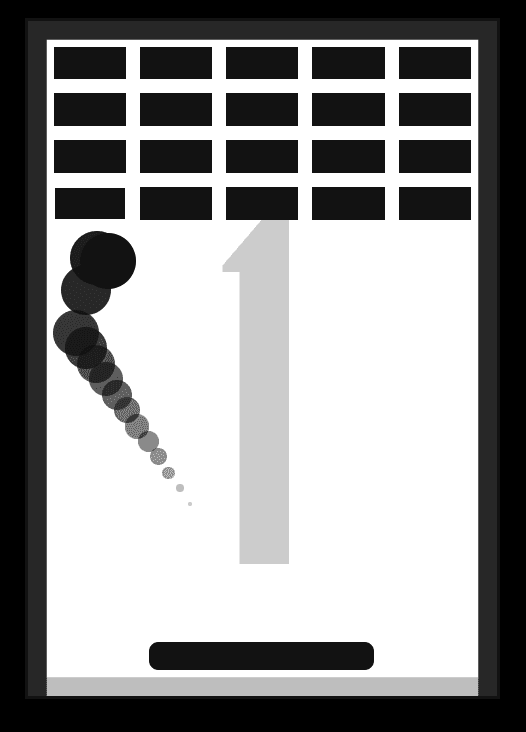
A classic brick-breaking arcade game where you control a paddle to keep a bouncing ball in play, rack up points, and test your reflexes across three thrilling game modes. Challenge yourself in Speed mode with accelerating gameplay, Random mode with unpredictable angles, or Bricks mode to destroy all obstacles.
Genre: Brick Breaker / Breakout
Difficulty: Progressive (Easy to Extreme)
Developer · Quiz Editor
Omik Babariya is a full-stack developer and quiz editor at Unihfy Games. He writes most of the quiz questions, works on the sports and entertainment articles, and has built and tested a number of the games on the site.
Bounce was originally created by Tomás Malbrán and is published here under its original licence terms. We host and maintain this version, while preserving the required attribution.
How to Play
- Start by selecting one of three game modes from the main menu: Speed, Random, or Bricks.
- The game begins with the ball resting on top of your ship/paddle at the bottom of the screen.
- Use your mouse or arrow keys to position your ship directly under the ball.
- Click the screen, press Enter, or hit Space to launch the ball upward and begin the game.
- The ball will bounce off the top and side walls of the play area. Your goal is to keep it from falling off the bottom.
- Use your ship to intercept the bouncing ball by moving it back toward the center of the play area.
- Each time the ball bounces (off walls or your ship), your score increases by one point.
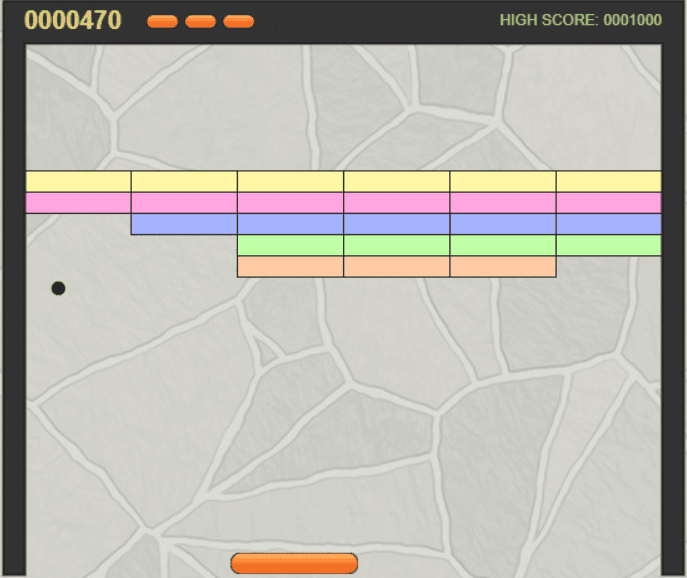
- In Bricks mode, colored bricks appear in formation at the top. Bounce the ball into them to destroy them and increase your score.
- The game becomes progressively harder: in Speed mode, the ball accelerates; in Random mode, it bounces unpredictably; in Bricks mode, you must clear all bricks before the ball escapes.
- If the ball falls off the bottom of the screen, the game ends.
- When you lose, you can save your high score by entering your name on the game over screen.
- View the leaderboard to see the top 5 scores for each game mode and track your progress.
Gameplay Preview
Features
FAQs
What's the difference between the three game modes?
Speed Mode starts slow and gradually accelerates the ball, creating an increasingly difficult challenge. Random Mode bounces the ball at unpredictable angles and speeds, making gameplay chaotic but fair. Bricks Mode features a classic breakout setup with 20 destructible bricks arranged in a grid, and provides a wider paddle to help you focus on strategy rather than pure reflexes.
How is my score calculated in Bounce?
Your score increases by 1 point for every time the ball bounces - whether it's off a wall, your paddle, or a brick in Bricks Mode. The longer you keep the ball in play without it falling off the bottom, the higher your score will be. In Bricks Mode, you also earn points for each brick you destroy, combined with your bounce count.
Can I play Bounce on my phone or tablet?
Yes! Bounce is a browser-based game that works on all modern devices including smartphones and tablets. You can control the paddle using mouse/touch input on desktop, or touch-and-drag controls on mobile devices. The responsive design adapts to different screen sizes for optimal gameplay.
Are my high scores saved permanently?
Your high scores are saved in your browser's local storage, which means they persist even after closing the browser or restarting your device. However, if you clear your browser's cache and cookies, you'll lose your saved scores. For maximum security, keep your browser cache intact, and consider taking screenshots of your top scores.
What happens if I pause the game? Can I resume where I left off?
Yes! Pressing P or clicking the pause button freezes the game instantly. When you resume by pressing P again or clicking Continue, the game picks up exactly where you left off - same ball position, same speed, same score. You can pause and unpause as many times as you want without any penalties.
In Bricks Mode, what happens after I destroy all the bricks?
Once you've destroyed all 20 bricks in Bricks Mode, they don't respawn. However, the ball is still in play and continues bouncing. The game ends when the ball eventually falls off the bottom of the screen. You can continue racking up points from bounces even after clearing all bricks, increasing your final score.
Is there a way to make the game easier or harder?
The game doesn't have adjustable difficulty sliders - instead, it offers three different modes with inherently different challenge levels. Speed Mode is easiest to start with since the ball begins slowly. Random Mode is moderately challenging due to unpredictability. Bricks Mode is strategic and moderate. You can also improve your skills through practice to handle increasingly difficult scenarios.
How fast does the ball move in Speed Mode at maximum?
In Speed Mode, the ball starts at a minimum speed and gradually increases with each bounce using a consistent acceleration factor. There's a maximum speed limit built into the physics engine to prevent the game from becoming impossible. You'll eventually reach a point where reflexes alone can't keep up, which is where the real challenge lies.
Can I change the paddle/ship size?
The paddle size is fixed per game mode and cannot be manually adjusted. In Speed and Random modes, you get a smaller paddle (5em width) for an increased challenge. In Bricks Mode, you get a wider paddle (12em width) to help you focus on destroying bricks rather than just surviving. This balanced design ensures fair gameplay for each mode.
What are the controls if I prefer keyboard over mouse?
You can use the Left and Right arrow keys to move your paddle instead of the mouse. Press Enter or Space to launch the ball. For menus, use the keyboard shortcuts shown with underlined letters (E for Speed, R for Random, K for Bricks, etc.). P pauses the game, and M toggles sound. Keyboard control is ideal for players who prefer not to use a mouse.
More like this
Ready for a Challenge?
Play quizzes, earn XP, collect rewards and climb the leaderboard.
Go to Quiz ArenaMore like this

Ready for a New Challenge?
Take on exciting quizzes, improve your general knowledge, earn XP, collect rewards, maintain your daily streak, and compete with players on the Quiz Arena leaderboard.
Go to Quiz Arena