The World's Hardest Game 2
Games > The World's Hardest Game 2
Play The World's Hardest Game 2 • Free
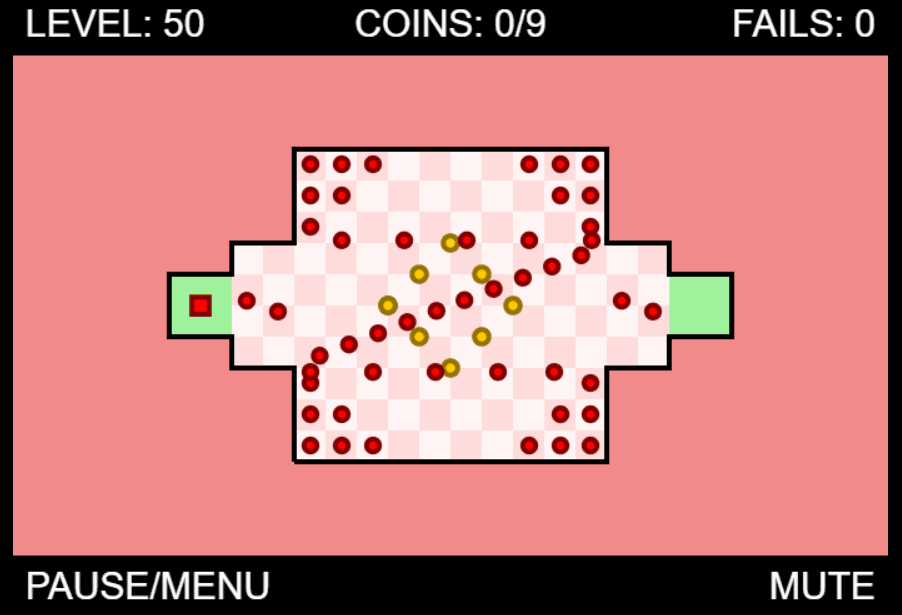
Navigate through 50 challenging maze levels filled with moving obstacles and deadly enemies. Collect all coins while avoiding blue enemies to unlock the exit and progress through increasingly difficult stages.
Genre: Action Puzzle
Difficulty: Hard

Editor · Game Reviewer
Kaushik Hirpara is an Editor and Game Reviewer at Unihfy Games, where he works on gameplay testing, browser game guides, gaming articles, controls, mechanics, and player-focused game information.
How to Play
- Use arrow keys or WASD to move your red square character
- Collect all yellow coins in each level to unlock the green exit door
- Avoid touching blue enemies - they will kill you instantly
- Reach checkpoints (gray squares) to save your progress in the level
- Complete all 50 levels to win the game
- Death counter tracks your failed attempts
- Some levels require keys to open locked doors
Gameplay Preview
Features
FAQs
How do I beat the first level?
Move your red square to collect all yellow coins while avoiding the blue moving enemies. Once all coins are collected, the green exit door will open - reach it to complete the level.
What happens when I touch an enemy?
Touching any blue enemy will instantly kill your character and you'll respawn at the last checkpoint you reached or at the level start if no checkpoints were activated.
How many levels are in the game?
The game contains 50 unique levels with increasing difficulty. Each level introduces new enemy patterns, maze layouts, and challenges to overcome.
Can I play on mobile devices?
Yes! The game features full mobile support with touch controls. Simply touch and drag anywhere on the screen to move your character through the levels.
What do the gray squares do?
Gray squares are checkpoints. When you touch them, they save your progress in the current level. If you die, you'll respawn at the last activated checkpoint instead of the level start.
How do I unlock doors in some levels?
Some levels contain locked doors that require keys. Collect the yellow key first, then the corresponding door will open allowing you to access new areas of the level.
Is there a way to change the player color?
Yes! You can customize your player's color from the main menu. The game offers various color options including a rainbow effect that cycles through different colors during gameplay.
More like this

Ready for a Challenge?
Play quizzes, earn XP, collect rewards and climb the leaderboard.
Go to Quiz ArenaMore like this






Ready for a New Challenge?
Take on exciting quizzes, improve your general knowledge, earn XP, collect rewards, maintain your daily streak, and compete with players on the Quiz Arena leaderboard.
Go to Quiz Arena